
Your lead generation campaign generates 300 leads a month. The cost per lead is on target. The client is happy… until the sales team says that Half of those contacts don’t answer the phone and the other half don’t have the budget.
It rings a bell, doesn’t it?
The problem isn’t the algorithm. The problem is what we’re telling it. If Google Ads only knows that someone has filled in a form, it will optimise to get more forms. Not more customers.
The solution has a name: offline conversions. And by 2026, the way they are implemented has changed, so it’s worth taking the time to look into it properly.
The problem: optimising for the wrong lead
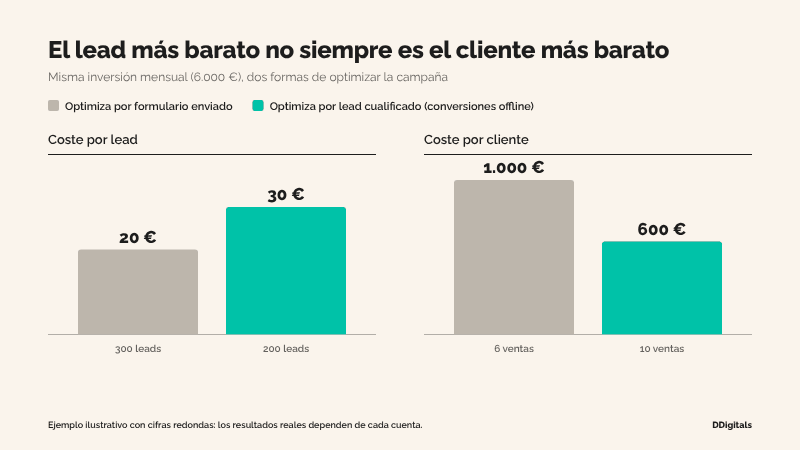
Automatic bidding strategies (Maximise Conversions, Target CPA, Target ROAS) are very effective at doing exactly what you ask them to do.
That is precisely the risk.
If the only signal the campaign receives is «form submitted», the system will learn to identify the people who are most likely to fill in forms. These are not always the same as those who end up making a purchase.
That’s why we see so many accounts with an excellent CPL and a cost per customer that nobody dares to calculate.
A cheap lead that doesn’t convert isn’t a cheap lead. It’s just an expense dressed up to look good.
What are offline conversions in Google Ads?
An offline conversion is any business outcome that takes place outside your website but is triggered by a click on an advert.
For example:
- A lead that the sales team has marked as qualified.
- A scheduled visit or demonstration.
- A proposal has been submitted.
- A sale closed in the CRM, with its actual amount.
Importing these events into Google Ads allows the campaign to stop optimising for the form and start optimising for the real business.
It’s the difference between telling the algorithm «find me people who fill in forms» and telling it «find me people similar to those who buy from us».
GCLID versus enhanced conversions for leads
There are two main ways of linking the click to the final result.
1. Standard import using GCLID
Every Google Ads click carries an identifier (the GCLID). You capture it in the form, save it in the CRM alongside the lead, and when that lead progresses, you send it back to Google Ads with the conversion.
It works, but it’s fragile: if the GCLID is lost along the way (redirects, third-party forms, incorrectly configured hidden fields, device changes…), the conversion cannot be attributed.
2. Increased conversions for leads
This is the improved version. Rather than relying solely on the GCLID, it uses the data the user entered into the form (usually their email address or telephone number), sent in encrypted form (SHA-256 hash), to match the lead with the click.
Practical benefits:
- More robust: It does not break if the GCLID is lost.
- Cross-device: It can attribute conversions even if the user switches devices.
- Easier to assemble In many cases, especially if you’re already using a CRM.
Google now regards standard import as a legacy feature and directly recommends ‘enhanced conversions for leads’ to anyone starting from scratch. You can view the official documentation at Google Ads support.
What has changed in 2026: Data Manager
From 15 June 2026, increases in offline conversions and enhanced conversions for leads will be processed via Data Manager and are no longer accepted by the Google Ads API (with the exception of legacy cases).
In addition, Google is combining enhanced conversions for the web and for leads into a single activation setting.
Translation for the marketing teams:
If you have an old integration (a script, a custom connector, an automation set up years ago) that uploads conversions via the API, check it. It may have gone months without sending anything and nobody may have noticed.
It is one of the first things we check when we audit a deposit account.
How to implement it step by step
The general outline, without going into the technical details of each CRM:
- Define what constitutes a good lead. Before getting into any technical details, agree with the sales team on which stages are important: qualified lead, opportunity, sale.
- Create offline conversion actions in Google Ads, one for each stage you want to track.
- Enable enhanced conversions and accepts the Google Ads data processing terms.
- Enter the details in the form: Always include an email address and/or telephone number, and the GCLID in a hidden field as a backup.
- Keep it all in the CRM associated with the lead (Pipedrive, HubSpot, Salesforce, etc.).
- Automate the upload via Data Manager, either using the native connector, a scheduled file or an automation tool such as Make or Zapier.
- Deliver value, not just volume. If you know how much a sale (or a lead) is worth, enter that figure. That’s what enables you to bid based on value.
Step 1 is the most important one, and the one that is most often skipped. Without a clear definition of a qualified lead, you’ll simply be automating noise.
Which stages of the funnel to import (and when)
There is a balance here between signal quality and volume.
Automated strategies need a minimum number of conversions to learn. If you only import closed sales and you close five a month, the algorithm won’t have enough data.
That is why we usually recommend:
- Qualified lead as the primary conversion metric for optimisation when sales volume is low.
- Value-based sales as the primary conversion when there is sufficient volume, or as a secondary conversion for measurement purposes.
- Form submitted as a secondary conversion: useful for reporting, but not for bidding.
And a word of warning: the sales cycle matters. If it takes 60 days to close a lead, the signal will arrive too late. An intermediate stage (qualification or demo) is usually the most practical starting point.
Common mistakes we see in accounts
Import without cleaning
If your CRM is in a mess (duplicate leads, stages that nobody updates), the signal you send to Google will be too.
Double conversions
Marking both the form and the qualified lead as ‘primary’ means the campaign counts the same thing twice and performs less effectively.
Clear the form data
Without standardised email addresses or telephone numbers (in lower case, without spaces, and with the international dialling code), the match rate plummets.
Fit it and don’t check it
Integrations fail silently. Check your conversion reports regularly and compare what Google Ads shows with what your CRM shows.
Change the conversion for hit optimisation
Switching from «form» to «sale» overnight resets the learning process. It’s better to do this gradually, allowing time for the campaign to stabilise.
From CPL to cost per customer
Offline conversions are not just another technical tweak. They represent the shift in mindset that distinguishes a lead generation campaign that generates volume from one that generates business.
Because the algorithm can optimise almost anything.
The question is whether you’re asking them to prioritise what really matters to you.
At DDigitals We integrate Google Ads, CRM and automation so that your campaigns learn from actual sales, not just from forms. Find out how we work o Fill in the form to start your journey with DDigitals.

